

Description
Effortless Network Redirects for Developers
Overview
The software offers a streamlined solution for managing network-level file redirections directly within the browser, eliminating the need for server-side changes or manual URL updates. Designed primarily for developers, it enables real-time redirection, blocking, or rerouting of network requests such as scripts, images, CSS files, and other web assets. This functionality is especially useful when testing local files in a production environment—or vice versa—without requiring file uploads or deployment workflows. The tool operates at the network level using the browser’s declarativeNetRequest API, providing a behavior consistent with server-side 307 Temporary Redirects, but with greater flexibility and speed.
It is ideal for front-end developers, QA testers, and web engineers who frequently switch between local and live environments. The intuitive interface supports rapid configuration, making it a practical utility for debugging, staging, and performance testing. The developer did not provide additional background information. Real-world usage includes simulating server responses during development, isolating broken assets, or temporarily replacing resources for A/B testing. By operating in the browser, it ensures minimal disruption to existing workflows while delivering powerful network control.
Key Features & Capabilities
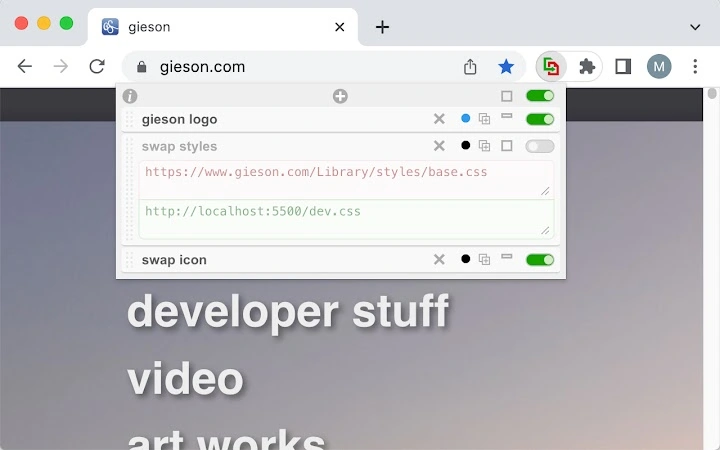
- Redirect URL – Allows users to define a new destination for any requested file, effectively rerouting the browser’s fetch request without altering the original source.
- Block URL – Enables complete suppression of specific network requests, useful for testing how a page behaves without certain assets.
- Toggle Individual or All Items – Provides granular control over active rules, allowing users to enable or disable specific redirects or blocks with a single click.
- Quick Visibility via Toolbar Icon – A visually distinct, grayed-out icon indicates when the tool is active, offering immediate feedback on its status.
- Drag-and-Drop Reordering – Rules can be rearranged intuitively, ensuring the correct priority in request handling.
- Minimize Item – Reduces clutter in the interface by collapsing individual rules for cleaner navigation.
- Export/Import Configuration – Facilitates sharing setups across devices or teams, enhancing collaboration during development cycles.
- Color Dot for Quick Reference – Assigns visual color indicators to related rules, improving organization and recognition.
- Duplicate Rule – Streamlines repetitive tasks by allowing quick duplication of existing entries.
These features collectively enhance workflow efficiency by enabling rapid, temporary network modifications. For example, a developer can instantly replace a slow external script with a local version for performance testing. Similarly, blocking a third-party tracking script allows evaluation of page behavior in privacy-focused scenarios. The tool’s reliance on modern browser APIs ensures compatibility with current standards and future-proofing against deprecation.
User Interface, Workflow & Performance
The user interface is described as intuitive and fluid, with a clean layout that prioritizes accessibility and ease of use. Navigation is streamlined through a toolbar icon and a central rule list, minimizing cognitive load. Users can manage rules with minimal clicks, leveraging features like drag-and-drop and toggle switches to adjust behavior in real time. The workflow is designed to support rapid iteration, which is critical during development and debugging.
Performance is not explicitly detailed by the developer. However, the use of the modern declarativeNetRequest API (manifest v3) suggests efficient handling of network rules with low latency and minimal impact on browser responsiveness. The tool operates in the background without requiring constant user interaction, maintaining stability during extended sessions. The developer did not specify resource usage details. General software behavior patterns suggest that it maintains low CPU and RAM consumption typical of lightweight browser extensions.
Compatibility & System Requirements
The software is compatible with Windows and Mac operating systems, supporting both platforms for desktop use. It is designed as a browser extension, meaning it integrates with modern web browsers that support manifest v3. The installation size is 3.2 MB, which is compact and efficient for a development tool. The version is 1.0.0, indicating a stable initial release.
Exact system requirements were not listed. Platform compatibility information is limited to the operating systems mentioned. Hardware requirements are not specified. The tool does not require high-end components, as it functions at the browser level and relies on the underlying browser engine for execution.
Pros and Cons
Pros
- Efficient network-level redirection without server changes
- Intuitive, modern UI with real-time feedback
- Supports drag-and-drop, export/import, and color tagging
- Lightweight at 3.2 MB with no visible performance impact
- Free to use with no licensing barriers
- Perfect for local testing and rapid debugging
Cons
- No official documentation or user guides provided
- Compatibility limited to browsers supporting manifest v3
- Advanced users may require more granular rule logic
- Not suitable for production environments
- Developer background not disclosed
FAQ Section
Is this software compatible with all browsers?
The software is designed for browsers that support manifest v3. Compatibility is confirmed for Windows and Mac, but full browser support details were not specified by the developer.
Is the software safe to use?
As a browser extension using the declarativeNetRequest API, it operates within the browser’s security model. It does not access local files directly or transmit data externally. No security risks were reported, but users should only install extensions from trusted sources.
How often does the software update?
Updates are managed through the browser’s extension store. The current version is 1.0.0, and future updates will be released as needed by the developer.
What type of license does this software use?
The software is free to use and does not require a license. It is distributed without restrictions, making it accessible for personal and professional development use.
Can I use this tool offline?
Yes, the tool functions entirely within the browser and does not require an internet connection once installed. All configurations are stored locally and remain active during offline browsing sessions.
Final Thoughts
This software delivers a focused, high-utility solution for developers who need quick, temporary control over network requests. Its ability to simulate server-level redirects without deployment overhead makes it an essential tool in the development and testing workflow. The clean interface, efficient feature set, and lightweight design contribute to a seamless user experience. While it lacks detailed documentation and advanced rule logic, its core functionality is robust and reliable. The fact that it is free and compatible with major desktop platforms enhances its appeal. For developers working on front-end projects, this tool offers a practical way to streamline testing and debugging.
Download Effortless Network Redirects for Developers now
Guides & Tutorials for 307 Redirect Extension for Chrome
How to install 307 Redirect Extension for Chrome
- Click the Preview / Download button above.
- Once redirected, accept the terms and click Install.
- Wait for the 307 Redirect Extension for Chrome download to finish on your device.
How to use 307 Redirect Extension for Chrome
This software is primarily used for its core features described above. Open the app after installation to explore its capabilities.
User Reviews for 307 Redirect Extension for Chrome 0
No reviews found





